Maulidar: A Friendly Brush Font for Real Creativity
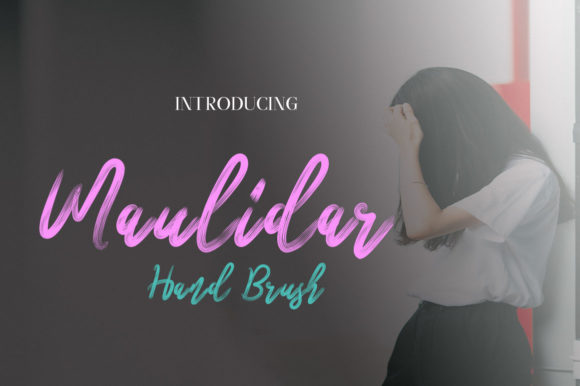
There’s something quietly powerful about a font that feels handmade but holds up in real-world use—and Maulidar delivers exactly that. It’s a brush script typeface with soft, natural strokes, gentle contrast, and just enough personality to stand out without overwhelming. No sharp edges, no forced drama—just approachable warmth and modern clarity. That balance makes it unusually versatile: as comfortable on a hand-lettered Instagram story as it is anchoring a small business logo or giving personality to an educational worksheet.
What Makes Maulidar Stand Out (Without Trying Too Hard)
Maulidar isn’t built for attention-grabbing stunts. Its charm lies in restraint: consistent stroke weight, open letterforms, and subtle bounce in the baseline that suggests movement—not chaos. Unlike many brush fonts that lean heavily into whimsy or exaggeration, Maulidar keeps its rhythm grounded. Letters connect smoothly but never force ligatures; spacing breathes without feeling sparse; lowercase ‘a’, ‘g’, and ‘y’ have friendly, rounded terminals that invite readability—not just admiration.
It works especially well at medium sizes (16–48px), where its texture shines without sacrificing legibility. And because it includes standard OpenType features like contextual alternates and stylistic sets, you can nudge tone subtly—swap a bouncy ‘t’ for a more upright one, or soften a ‘k’ for gentler emphasis—without switching fonts.
Creative Uses That Actually Work
Here’s where Maulidar earns its keep—not as decoration, but as functional design fuel:
- Small business branding: A local pottery studio uses Maulidar for its “Handmade Since 2017” tagline on packaging and receipts—clean enough for trust, warm enough to reflect craft. No need for secondary fonts; pairing it with a neutral sans-serif (like Inter or Lato) creates instant hierarchy and cohesion.
- Educational materials: Teachers print reading comprehension worksheets with Maulidar headings and subheadings—it signals “this part matters,” while remaining accessible to developing readers. The open counters and generous x-height reduce visual fatigue during longer tasks.
- Digital content: Bloggers and newsletter writers apply Maulidar sparingly—to pull quotes, section dividers, or email subject lines. Used once per screen or message, it adds human rhythm amid uniform text blocks.
- Print-on-demand products: Artists and hobbyists embed short phrases (“Breathe Deeply”, “Try Again Tomorrow”) in Maulidar on greeting cards or minimalist posters. Its friendliness translates well to tactile paper stock—no digital gloss needed.
Adapting Maulidar Across Audiences and Platforms
How you use Maulidar depends less on what it *is*, and more on what your audience needs—and how much visual real estate you have.
For entrepreneurs and freelancers, think function first: use it for value statements (“Your Ideas, Thoughtfully Built”) on service pages—not headlines, not body copy, but the line that answers “Why work with you?” Keep color simple (charcoal, deep navy, or muted terracotta) so tone stays sincere, not playful.
Bloggers and educators benefit from its clarity at smaller sizes. Try setting key definitions or learning objectives in Maulidar at 20px, then follow with supporting text in a highly legible sans-serif. This creates visual pacing—not distraction—and helps readers scan without losing meaning.
Marketers and publishers should treat Maulidar like a voice actor: cast it for moments that need warmth and authenticity—not every sentence, but the ones that carry emotional weight. In a product launch email, use it only for the core promise (“This changes how you plan your week”), then switch to crisp body text for features and next steps.
Keeping It Effective—Not Just Pretty
A great font can become a crutch if overused—or worse, misapplied. Here’s how to stay intentional with Maulidar:
- Limits build strength: Restrict it to one typographic role per project—headings, pull quotes, or logos. Never use it for long paragraphs, captions under complex charts, or tiny interface labels.
- Contrast is non-negotiable: Pair it only with fonts that offer clear structural difference—geometric sans-serifs, sturdy slab serifs, or even clean monospaced options. Avoid other scripts or decorative fonts nearby; they compete, not complement.
- Test before you commit: Render your layout on mobile, tablet, and desktop. Does the ‘e’ remain distinct at 18px on a low-DPI screen? Does the ‘s’ hold shape when exported as SVG for web use? Small inconsistencies compound quickly.
- Respect context: A wellness app using Maulidar for meditation prompts lands differently than a fintech dashboard using it for “Your Portfolio Is Growing.” Match tone to expectation—not aspiration.
Simple Projects to Start With Today
You don’t need a full rebrand to explore Maulidar’s potential. Try these low-lift, high-impact ideas:
- Create a printable weekly reflection sheet: Maulidar for section headers (“What Energized Me?”, “One Thing I’ll Adjust”), clean sans-serif for responses.
- Redesign your email signature: Use Maulidar for your name only—nothing else. Let it be the quiet anchor.
- Design a social media carousel slide: One bold phrase in Maulidar (centered, ample padding), plain white background, no extra graphics. See how much tone it carries alone.
- Update your Notion dashboard: Swap default headings for Maulidar in your personal goals or habit tracker—just for visual reinforcement of intention.
Maulidar doesn’t ask you to reinvent your process. It asks you to notice where warmth and clarity are missing—and fill that gap with something honest, legible, and quietly confident. It’s not about making things look “designed.” It’s about making them feel considered.
That’s the kind of tool that grows with you: useful in your first client pitch, your fifth workshop handout, your twentieth newsletter. Not flashy—but dependable. Not trendy—but timely. Not loud—but unmistakably present.